Getting started
Installation
By intention, installation shall be as easy as
pip install SigmaMu
By the time this is read by anybody but me, the package is available on PyPi, hence this shall work. The tests can then be run, if pytest is available (see below) via
pytest --pyargs simu
Also this is supposed to work without any failed tests.
SigmaMu depends on the following packages:
Name |
What for |
|---|---|
All symbolic algebra in the background is based on it |
|
All modelling happens via |
|
Number crunching, in particular linear algebra |
|
For advanced numeric methods, utilised for instance by the solver |
|
Efficient solving of linear equation systems on multiple cores |
|
The chosen format for configuration files. |
For development, we require additionally
Name |
What for |
|---|---|
For running the unit tests |
|
In examples, we like to plot results sometimes |
|
The documentation is built with it. |
|
Handling of bibliographies in documentation |
|
For including the license file into the docs |
|
For the fancy copy buttons on the scripts in the docs |
|
To run doctest elements in rst-files |
Hello World
To call the following a process model is quite an insult to actual process models, but it is a start:
1class Square(Model):
2    """A model of a square"""
3
4    def interface(self):
5        self.parameters.define("length", 10, "m")
6        self.properties.declare("area", "m^2")
7
8    def define(self):
9        self.properties["area"] = self.parameters["length"] ** 2
To create a model, we derive from the Model class and need to implement the following two methods:
In the interface method, we define a model parameter called length and declare to calculate a property called area.
In the define method, the property area is assigned to be the square of the length parameter.
Next, we want to do something with the model. To do that, we wrap it into an instance of NumericHandler and create a QFunction object:
>>> numeric = NumericHandler(Square.top())
>>> func = numeric.function
Now we can print the argument structure of the function:
>>> print(func.arg_structure)
{'model_params': {'length': 'm'}, 'vectors': {'states': ''}}
The QFunction is a function object that works on nested dictionaries of pint quantities, whereas the magnitude is of type casadi.SX. When querying the arg_structure, the values of the dictionaries are the units of measurements as defined in the model’s interface.
The length parameter is a model parameter and registered as such. We have not defined any materials, and hence there are no thermodynamic state variables.
Likewise, we can query what the model will return:
>>> print(func.result_structure)
{'model_props': {'area': 'm ** 2'}, 'vectors': {'bounds': '', 'residuals': ''}}
As there are no model constraints, the residuals section here is empty, but we find the calculated area as a model property.
The model has also collected the default input values for us.
>>> args = numeric.arguments
>>> print(args)
{'vectors': {'states': <Quantity(0x1, 'dimensionless')>}, 'model_params': {'length': <Quantity(10.0, 'meter')>}, 'thermo_params': {}}
For a larger real-life problem, this would also include the initial set of independent variables (state) and all thermodynamic parameters, collected from the various data sources. Here we see only the length parameter as being 10 m.
We can overwrite that parameter by changing its value in the obtained structure
>>> args[NumericHandler.MODEL_PARAMS]["length"] = Quantity(20, "cm")
>>> result = func(args)
>>> print(f"{result[NumericHandler.MODEL_PROPS]['area']:.3fP~}")
0.040 m²
Note that the formatting of the physical quantities is utilising Pint functionality.
Normal project structure
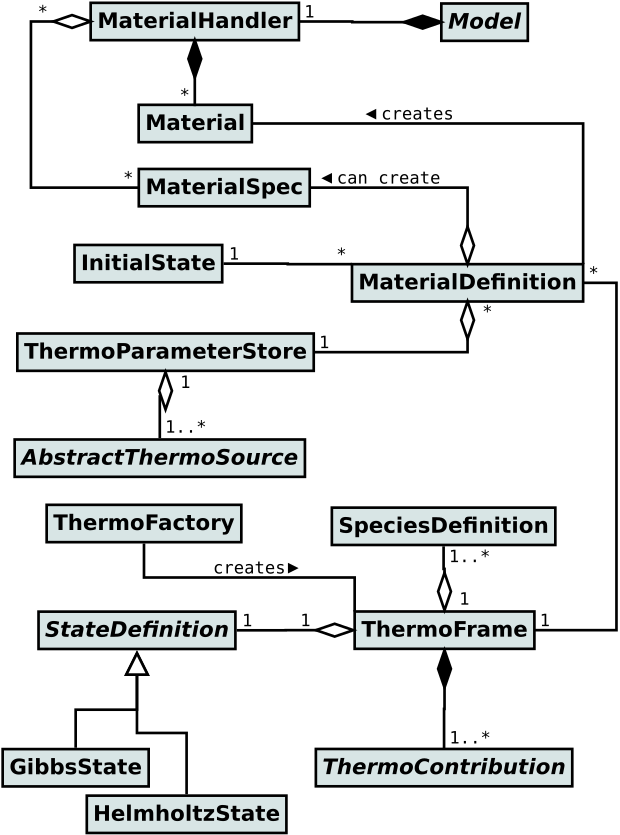
Above example is cute but no use-case for using SigmaMu. Admittedly, the area of a square can instead be calculated in one line of code. A real project starts with the setup of thermodynamic models to calculate physical properties of the materials that are part of the model. In SigmaMu, a thermodynamic model is represented by a ThermoFrame object and consists of ThermoContribution object, the latter of which can be combined and extended with high flexibility. Examples for such contributions are ideal gas heat capacity, mixing rules, and Poynting corrections in Gibbs excess models.
Once the thermodynamic model structures are defined, data sources are organized to provide the thermodynamic parameters, such as standard state parameters or critical constants. Naturally, the set of required parameters depend on the model structure and the set of chemical species.
Now the thermodynamic models are in place, and we can define materials. Material definitions, on top of the thermodynamic model singletons, define the utilised set of chemical species and a representative initial state. Material definitions are then used within the Model class to define instances, defining flows of materials or stagnant states, such as phase interface conditions.
Below diagram shows the object relationships in an overview.
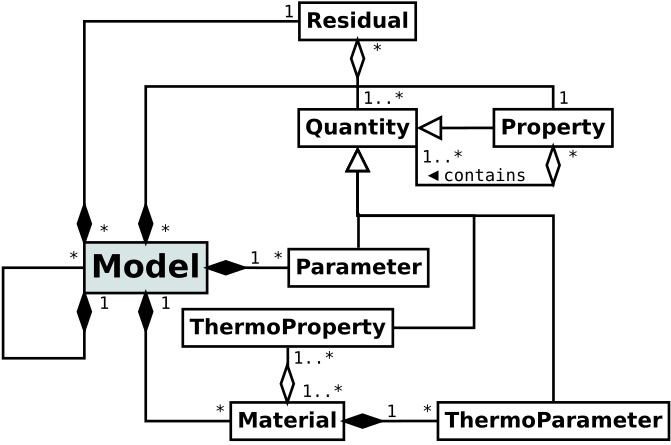
Each Material instance introduces independent variables (states) to the model, which uses the thermodynamic properties in combination with model parameters (mostly operational and design parameters) to evaluate both model properties of interest, but also Residual properties, representing process constraints.
In summary, a Model object holds the following entities
Materialobjects representing a quantity of matter with a thermodynamic state
Parametersas input physical quantities that impact the process constraints and/or calculated properties
Propertiesas calculated physical quantities as function of thermodynamic properties and parameters
Residualsrepresenting the model constraints and being a function of thermodynamic properties and parameters
For all but the smallest projects, the model is not a monolith, but a hierarchical composition of sub-models, each representing an encapsulated physical aspect of the system.
The figure below shows the collaboration diagram of involved entities:
Model application range
In standard simulations, the number of process constraints and state variables are equal - the system is square. The system is then solved as a non-linear equation system with a (hopefully) unique solution. However, instead of plain solving, one can conduct
Data reconciliation: Minimising the deviation between measured data and calculated model properties over the state of the model, constrained by a reduced set of residuals;
Parameter fit: Fitting model parameters common over multiple data-sets in combination with individual model states, constrained by the model’s residuals, to minimise deviation between measured data and calculated model properties;
Thermodynamic parameter fit: Like Parameter fit, but specifically with thermodynamic parameters, often utilising laboratory data concerning equilibrium or calorimetric data;
Parameter optimisation: Minimizing an objective function as function of model properties over the thermodynamic state and model parameters, constrained by the model’s residuals.
The derivatives required to efficiently perform these disciplines can easily be obtained, based on CasADi functionality.
Where are the limits?
So far, the experience and usage of SigmaMu is limited, but the predecessor, pyasim has been used in many in-house projects, including detailed CO2 removal systems, plant-wide ammonia production processes, and detailed absorption column models for NOx gasses on Sieve trays and packings. Model sizes up to 80000 variables/equations have been solved. This, due to the way of building the model and counting the variables, corresponds to more than one million equations for brute force general equation oriented modelling tools.
For the predecessor, pyasim, memory usage on ordinary business laptops became limiting for the largest models. This constituted one of the motivations to develop SigmaMu. With much more efficient memory handling by CasADi and multi-core computations, we do not yet know where the limits of SigmaMu are.